02. Moving to Agentic Frameworks#
In the previous tutorial we wired up a bare-bones agent manually. However, all the engineering around the agent, tools and memory can be offloaded to an Agentic framework. Agentic frameworks like Pydantic AI or LangChain simplify this by turning LLMs into structured, stateful agents that can:
Reason → generate thoughts or plans.
Act → call functions or tools safely.
Remember → maintain state across steps.
Validate → ensure model responses follow predefined schemas automatically.
Essentially, they make the “LLM + tools + memory” loop modular and robust.
Pydantic AI provides:
Automatic JSON validation via Pydantic models.
Cleaner syntax — you define structure, not glue code.
Built-in model orchestration with minimal setup.
Extensible memory and reasoning controls for larger agent systems.
This transition will help you focus on designing intelligent behaviors, not wiring model calls. We’ll keep the examples compact so you can focus on the core ideas, while also mapping each topic back to the official documentation so you can dig deeper on your own. Let’s extend our Agentic AI knowledge to include:
How the core
AgentAPI maps to models, prompts, and run results.How to register tools, inject dependencies, and read the
RunContext.How to add structured outputs, guardrails (validation + redaction), and retries.
How to stream responses and log the conversation with Logfire.
How to glue everything together in a realistic concierge use-case.
Where to find each concept inside the PydanticAI docs.
Intro to Pydantic AI#
PydanticAI’s site is organized by concept. As you experiment in this notebook, keep these reference pages open:
Topic |
Docs quick link |
Why it matters |
|---|---|---|
Agents & models |
Explains the |
|
Tools & dependencies |
Shows the |
|
Results & streaming |
Documents the output, streaming iterators, and metadata on each run. |
|
Observability |
Walks through Logfire setup, spans, and structured traces. |
We’ll point back to these sections throughout the tutorial so you can connect code to the syntax explained in the docs.
I highly recommend creating a free Logfire account for rich traces.
Meet the Agent class#
PydanticAI wraps model calls inside an Agent. You configure the model, give it a concise system prompt, and call run_sync to execute a turn.
We’ll use a concierge persona throughout the notebook.
Anatomy of Agent(...)#
The constructor mirrors the agent configuration docs:
model: A model adapter such asOpenAIModel,AnthropicModel, orLiteLLMModel. Each adapter exposes provider-specific settings via keyword arguments.system_prompt: A concise instruction that frames every conversation turn.deps_type: (Optional) A Pydantic model describing the structured dependencies your tools need.result_type: (Optional) A Pydantic model that constrains the final answer.tools: (Optional) A list of callables registered ahead of time. You can also decorate functions with@agent.toolas shown later.
Every Agent offers synchronous (run_sync) and asynchronous (run) helpers that return a RunResult. We’ll use the sync variants to keep the tutorial focused. We also use OpenRouter provider by explicitly specifying openrourter: in the model argument.
from pydantic_ai import Agent

from dotenv import load_dotenv
import nest_asyncio
nest_asyncio.apply()

load_dotenv()

concierge = Agent(
    model="openrouter:qwen/qwen3-next-80b-a3b-instruct",
    system_prompt="You are a friendly city concierge. Keep replies short, positive, and specific to Berlin.",
)

intro = concierge.run_sync("Welcome a visitor to Berlin in one sentence.")
print(intro.output)
19:57:01.284 concierge run
19:57:01.285   chat qwen/qwen3-next-80b-a3b-instruct
Welcome to Berlin—where history, culture, and vibrant energy come alive at every corner!
Agent accepts the model backend (OpenAI, Anthropic, etc.), a system prompt, and optional extras. run_sync sends the user message, waits for the model, and returns a RunResult with metadata like response_text, tool traces, and tokens.
RunResult carries the response_text, a structured data attribute when result_type is used, token usage, tool call history, and helper methods like .all_messages() to inspect the full transcript. Inspect it in the notebook or read the results guide for the complete schema. For instance, for the above call, we see the reasoning tokens as well for the response.
intro.all_messages()
[ModelRequest(parts=[SystemPromptPart(content='You are a friendly city concierge. Keep replies short, positive, and specific to Berlin.', timestamp=datetime.datetime(2025, 11, 3, 13, 37, 21, 267783, tzinfo=datetime.timezone.utc)), UserPromptPart(content='Welcome a visitor to Berlin in one sentence.', timestamp=datetime.datetime(2025, 11, 3, 13, 37, 21, 267783, tzinfo=datetime.timezone.utc))]),
 ModelResponse(parts=[ThinkingPart(content='\nOkay, the user wants me to welcome a visitor to Berlin in one sentence. Let me think about the key elements that make Berlin unique. There\'s the historical landmarks like the Brandenburg Gate and Berlin Wall, the vibrant culture, maybe the arts scene. Also, the city\'s mix of old and new, modern architecture alongside historical sites.\n\nI should make it friendly and positive. Use words that evoke warmth and excitement. Maybe mention the energy of the city, the blend of past and present. Avoid being too generic. Need to keep it concise, one sentence. Let me try a few versions.\n\n"Welcome to Berlin, where history meets innovation in a vibrant tapestry of culture and creativity!" That\'s good, but maybe too long. Let me check the character count. Alternatively, "Welcome to Berlin! Explore historic landmarks, dynamic art scenes, and a city where past and future collide." Hmm, maybe. Or "Berlin greets you with its rich history, cutting-edge culture, and endless energy—let the adventure begin!" \n\nI need to ensure it\'s specific to Berlin. Mentioning the Berlin Wall or Brandenburg Gate could be good, but maybe too specific. The user might prefer a more general welcome. Let me go with something that captures the essence without being too detailed. "Welcome to Berlin, a city where history, art, and innovation come alive in every corner!" That\'s catchy and covers the main aspects. Make sure it\'s one sentence and positive. Yeah, that works.\n', id='reasoning', provider_name='openrouter'), TextPart(content='Welcome to Berlin! Explore history, art, and innovation in a city where every corner buzzes with creativity. 🎨🏛️')], usage=RequestUsage(input_tokens=42, output_tokens=333, details={'reasoning_tokens': 0}), model_name='qwen/qwen3-30b-a3b', timestamp=datetime.datetime(2025, 11, 3, 13, 37, 22, tzinfo=TzInfo(0)), provider_name='openrouter', provider_details={'finish_reason': 'stop'}, provider_response_id='gen-1762177042-5y1MFitgxWypJDNHg3IN', finish_reason='stop')]
Agent also allows dynamic system prompts where we can change the system prompt based on the input context. We do this by providing a RunContext object that exposes the dependencies plus request metadata.
from pydantic_ai import RunContext

concierge = Agent(
    model="openrouter:qwen/qwen3-next-80b-a3b-instruct",
)

@concierge.system_prompt
def add_city(ctx: RunContext[str]) -> str:
    return f"You are a friendly city concierge. Keep replies short, positive, and specific to {ctx.deps}."

intro = concierge.run_sync("Give an itinerary for a tourist for a single day in one sentence.", deps="Moscow")
intro.all_messages()
19:57:10.216 concierge run
19:57:10.231   chat qwen/qwen3-next-80b-a3b-instruct
[ModelRequest(parts=[SystemPromptPart(content='You are a friendly city concierge. Keep replies short, positive, and specific to Moscow.', timestamp=datetime.datetime(2025, 11, 3, 14, 27, 10, 231090, tzinfo=datetime.timezone.utc)), UserPromptPart(content='Give an itinerary for a tourist for a single day in one sentence.', timestamp=datetime.datetime(2025, 11, 3, 14, 27, 10, 231090, tzinfo=datetime.timezone.utc))]),
 ModelResponse(parts=[TextPart(content='Start at Red Square, explore the Kremlin and St. Basil’s, enjoy lunch at GUM, stroll through Arbat Street, and end with sunset views from Sparrow Hills.')], usage=RequestUsage(input_tokens=46, output_tokens=37), model_name='qwen/qwen3-next-80b-a3b-instruct', timestamp=datetime.datetime(2025, 11, 3, 14, 27, 11, tzinfo=TzInfo(0)), provider_name='openrouter', provider_details={'finish_reason': 'stop'}, provider_response_id='gen-1762180031-jfcS5f57CdDA4B75fqQr', finish_reason='stop')]
We see the system prompt changed as per the input. We can do something similar for other aspects such as adding today’s date. We can also get all messages in JSON format.
from datetime import date
import json

@concierge.system_prompt
def add_the_date() -> str:
    return f'The date is {date.today()}.'

intro = concierge.run_sync("Give an itinerary for a tourist for a single day in one sentence.", deps="New Delhi")
json.loads(intro.all_messages_json())
19:57:17.029 concierge run
19:57:17.029   chat qwen/qwen3-next-80b-a3b-instruct
19:57:18.156   chat qwen/qwen3-next-80b-a3b-instruct
[{'parts': [{'content': 'You are a friendly city concierge. Keep replies short, positive, and specific to New Delhi.',
    'timestamp': '2025-11-03T14:27:17.029166Z',
    'dynamic_ref': None,
    'part_kind': 'system-prompt'},
   {'content': 'The date is 2025-11-03.',
    'timestamp': '2025-11-03T14:27:17.029166Z',
    'dynamic_ref': None,
    'part_kind': 'system-prompt'},
   {'content': 'Give an itinerary for a tourist for a single day in one sentence.',
    'timestamp': '2025-11-03T14:27:17.029166Z',
    'part_kind': 'user-prompt'}],
  'instructions': None,
  'kind': 'request'},
 {'parts': [],
  'usage': {'input_tokens': 59,
   'cache_write_tokens': 0,
   'cache_read_tokens': 0,
   'output_tokens': 0,
   'input_audio_tokens': 0,
   'cache_audio_read_tokens': 0,
   'output_audio_tokens': 0,
   'details': {}},
  'model_name': 'qwen/qwen3-next-80b-a3b-instruct',
  'timestamp': '2025-11-03T14:27:18Z',
  'kind': 'response',
  'provider_name': 'openrouter',
  'provider_details': {'finish_reason': 'stop'},
  'provider_response_id': 'gen-1762180038-ZAKPuNCkpmHESndbFkTX',
  'finish_reason': 'stop'},
 {'parts': [], 'instructions': None, 'kind': 'request'},
 {'parts': [{'content': 'Start your day at India Gate, explore Connaught Place for lunch and shopping, then unwind at Lodhi Gardens before watching the sunset at Humayun’s Tomb.',
    'id': None,
    'part_kind': 'text'}],
  'usage': {'input_tokens': 72,
   'cache_write_tokens': 0,
   'cache_read_tokens': 0,
   'output_tokens': 35,
   'input_audio_tokens': 0,
   'cache_audio_read_tokens': 0,
   'output_audio_tokens': 0,
   'details': {}},
  'model_name': 'qwen/qwen3-next-80b-a3b-instruct',
  'timestamp': '2025-11-03T14:27:19Z',
  'kind': 'response',
  'provider_name': 'openrouter',
  'provider_details': {'finish_reason': 'stop'},
  'provider_response_id': 'gen-1762180039-YFDpu03uE8rQ644eRLXw',
  'finish_reason': 'stop'}]
Tools + Dependencies: Local Concierge Use-Case#
Agents become useful once they can call real data. We’ll model a concierge that knows Berlin restaurants and events stored in plain Python dictionaries.
PydanticAI lets you declare a dependency schema (deps_type) and register tool functions with the @agent.tool decorator. Tools receive a RunContext that exposes the dependencies plus request metadata.
Why dependencies matter#
The docs describe dependencies as a way to share stateful resources (database clients, configuration, caches) without global variables. Defining deps_type with Pydantic gives you:
Validation – Data loaded into the dependency object is checked once, so tools always see a consistent shape.
Auto-complete – Type hints make editor tooling and docstrings clearer.
Runtime access – Inside a tool,
ctx.depsexposes that object alongside metadata such asctx.user_messageandctx.conversation.
We’ll start with an in-memory dataset, but the same pattern works with network or database clients.
from typing import Dict, List

from pydantic import BaseModel

class ConciergeDeps(BaseModel):
    events: Dict[str, List[str]]
    restaurants: Dict[str, List[str]]

    def lookup(self, city: str) -> dict:
        key = city.lower()
        return {
            "events": self.events.get(key, []),
            "restaurants": self.restaurants.get(key, []),
        }

berlin_data = ConciergeDeps(
    events={
        "berlin": ["Saturday street food market in Kreuzberg", "Museum Island late-night opening", "Spree sunset boat cruise"],
    },
    restaurants={
        "berlin": ["Five Elephant Coffee Roastery", "Markthalle Neun vendors", "Mustafas Gemüse Kebap"],
    },
)
from pydantic_ai import RunContext

guide = Agent(
    model="openrouter:qwen/qwen3-next-80b-a3b-instruct",
    system_prompt=(
        "You are a Berlin concierge. Use the `fetch_local_options` tool before planning a day so you stay factual. "
        "Summaries should include morning, afternoon, and evening suggestions."
    ),
    deps_type=ConciergeDeps,
)

@guide.tool
def fetch_local_options(ctx: RunContext[ConciergeDeps], city: str) -> dict:
    """Return curated restaurants and events for the requested city."""
    return ctx.deps.lookup(city)

day_plan = guide.run_sync(
    "Plan a Saturday in Berlin for a family with teenagers. Include meals and activities.",
    deps=berlin_data,
)
print(day_plan.output)
Here’s a fun, balanced Saturday plan in Berlin tailored for a family with teenagers — mixing food, culture, and movement:

### **Morning**
**Breakfast at Five Elephant Coffee Roastery**
Start the day with specialty coffee and freshly baked pastries at this beloved local roastery in Neukölln. Their avocado toast and vegan muffins are crowd-pleasers, and the cozy, industrial-chic vibe is Instagram-ready — perfect for teens.

**Activity: Street Food Market in Kreuzberg**
Head to the Saturday street food market at Markthalle Neun (just a short U-Bahn ride away). Teens will love the global flavors — try Korean tacos, gourmet burgers, or Portuguese custard tarts. Wander through the vibrant stalls, snap photos, and taste-test together.

### **Afternoon**
**Museum Island — Late-Night Opening (start early!)**
Browse the Pergamon Museum or the Altes Museum on Museum Island. The late-night opening means fewer crowds and a cool, atmospheric vibe. Teens often enjoy the ancient artifacts — especially the Ishtar Gate and the Pergamon Altar. Ask the museum staff for a quick “teen-friendly highlights tour” if available.

**Optional side activity:** Stroll along the Spree River toward the Berlin Cathedral for photos and ice cream from *Eisvariety* nearby.

### **Evening**
**Spree Sunset Boat Cruise**
Book a 1.5-hour evening cruise on the Spree River just before sunset. It’s a relaxing way to see Berlin’s skyline light up — including the Reichstag, the TV Tower, and the East Side Gallery. Many boats offer beer, soft drinks, and light snacks — a perfect end to a full day.

**Dinner at Mustafas Gemüse Kebap**
Wrap up the night with Berlin’s legendary vegan kebab — yes, even non-vegans crave it. This late-night favorite in Neukölln is a rite of passage. Grab a warm flatbread stuffed with vegetables, spicy sauce, and golden fries inside. Eat it on the go or at the picnic tables — it’s part of the fun!

*Pro tip:* Bring reusable bags for souvenirs and comfy shoes — you’ll be walking a lot!
Inspecting tool calls#
Tool executions are recorded on the result. You can explore them interactively or via code:
Each ToolCall matches the structure described in the tooling reference, including start/end timestamps and any raised errors.
Let’s break down all interactions below. We see:
Agent calls tool with the argument city as “Berlin”
uses the result to provide an informed response.
json.loads(day_plan.all_messages_json())
[{'parts': [{'content': 'You are a Berlin concierge. Use the `fetch_local_options` tool before planning a day so you stay factual. Summaries should include morning, afternoon, and evening suggestions.',
    'timestamp': '2025-11-03T13:47:14.738937Z',
    'dynamic_ref': None,
    'part_kind': 'system-prompt'},
   {'content': 'Plan a Saturday in Berlin for a family with teenagers. Include meals and activities.',
    'timestamp': '2025-11-03T13:47:14.738937Z',
    'part_kind': 'user-prompt'}],
  'instructions': None,
  'kind': 'request'},
 {'parts': [{'tool_name': 'fetch_local_options',
    'args': '{"city": "Berlin"}',
    'tool_call_id': 'call_3c9d2254767b45468ec8d3',
    'id': None,
    'part_kind': 'tool-call'}],
  'usage': {'input_tokens': 208,
   'cache_write_tokens': 0,
   'cache_read_tokens': 0,
   'output_tokens': 20,
   'input_audio_tokens': 0,
   'cache_audio_read_tokens': 0,
   'output_audio_tokens': 0,
   'details': {}},
  'model_name': 'qwen/qwen3-next-80b-a3b-instruct',
  'timestamp': '2025-11-03T13:47:16Z',
  'kind': 'response',
  'provider_name': 'openrouter',
  'provider_details': {'finish_reason': 'tool_calls'},
  'provider_response_id': 'gen-1762177636-T6lrZa9d7vSfMQwjYKZf',
  'finish_reason': 'tool_call'},
 {'parts': [{'tool_name': 'fetch_local_options',
    'content': {'events': ['Saturday street food market in Kreuzberg',
      'Museum Island late-night opening',
      'Spree sunset boat cruise'],
     'restaurants': ['Five Elephant Coffee Roastery',
      'Markthalle Neun vendors',
      'Mustafas Gemüse Kebap']},
    'tool_call_id': 'call_3c9d2254767b45468ec8d3',
    'metadata': None,
    'timestamp': '2025-11-03T13:47:16.073272Z',
    'part_kind': 'tool-return'}],
  'instructions': None,
  'kind': 'request'},
 {'parts': [{'content': 'Here’s a fun, balanced Saturday plan for a family with teenagers in Berlin — mixing culture, food, and lively local vibes:\n\n**Morning:**\nStart the day with a hearty breakfast at **Five Elephant Coffee Roastery** in Friedrichshain. It’s a stylish, spacious spot loved by locals — great for coffee, avocado toast, and pastries. Afterward, head to **Museum Island**. Though the museums open early, the highlight today is the **late-night opening** (which also means fewer crowds and extended hours if you plan your visit smartly). Focus on the Pergamon Museum or the Altes Museum — immersive for teens who like history or art. Bring a sketchbook if anyone enjoys doodling artifacts!\n\n**Afternoon:**\nStroll through the beautiful Berlin Cathedral grounds and cross the River Spree toward **Kreuzberg**. Grab your lunch at **Markthalle Neun** — this indoor food hall is a teen magnet with global street food stalls. Try a Korean taco, vegan ramen, or Brooklyn-style pizza. After eating, wander Kreuzberg’s vibrant street art alleys (especially around Oranienstraße), then head to the **Saturday Street Food Market** (12–6 PM), where live music, colorful stalls, and ice cream treats keep everyone happy.\n\n**Evening:**\nUnwind with a **Spree River Sunset Boat Cruise** (book ahead — sunset around 7:30 PM this time of year).floating past landmarks like the Reichstag, Berlin Cathedral, and TV Tower under golden light is magical. End the night back in Kreuzberg with soft-serve ice cream from a retro stall, or grab a late bite at the legendary **Mustafas Gemüse Kebap** — a Berlin institution that’s perfect for sharing fries and kebabs under string lights.\n\nIt’s a day full of energy, flavor, and local flavor — exactly what Berlin does best for families.',
    'id': None,
    'part_kind': 'text'}],
  'usage': {'input_tokens': 286,
   'cache_write_tokens': 0,
   'cache_read_tokens': 0,
   'output_tokens': 402,
   'input_audio_tokens': 0,
   'cache_audio_read_tokens': 0,
   'output_audio_tokens': 0,
   'details': {}},
  'model_name': 'qwen/qwen3-next-80b-a3b-instruct',
  'timestamp': '2025-11-03T13:47:17Z',
  'kind': 'response',
  'provider_name': 'openrouter',
  'provider_details': {'finish_reason': 'stop'},
  'provider_response_id': 'gen-1762177637-QSnmBhjYJbDl9yCYgAKb',
  'finish_reason': 'stop'}]
RunContext offers more than dependencies. Explore ctx.user_message, ctx.deps, and ctx.all_messages (the running transcript) inside tools to tailor behavior—e.g., short-circuiting repeat lookups. The context section of the docs lists every field you can rely on.
During the run the model can call fetch_local_options. The framework handles JSON arguments, dependency injection, and logging. Tool outputs are automatically threaded back into the model’s context so later messages can reference them.
Model retry + Logfire tracing#
Real traffic can be noisy: models may time out or return malformed JSON. ModelRetry replays a call with the same inputs. Combining it with Logfire gives you deep observability—every attempt (and tool call) shows up in the Logfire UI.
The snippet below mirrors the Logfire integration guide.
import logfire
from pydantic_ai import ModelRetry

logfire.configure(send_to_logfire=False) # set to true if you want to use logfire console
logfire.instrument_pydantic_ai()

guide = Agent(
    model="openrouter:qwen/qwen3-next-80b-a3b-instruct",
    system_prompt=(
        "You are a Berlin concierge. Use the `fetch_local_options` tool before planning a day so you stay factual. "
        "Summaries should include morning, afternoon, and evening suggestions."
    ),
    retries=4,
    deps_type=ConciergeDeps
)

@guide.tool
def fetch_local_options(ctx: RunContext[ConciergeDeps], city: str) -> dict:
    """Return curated restaurants and events for the requested city."""
    if city.lower() not in ['berlin']:
        ModelRetry('no data for this city')
    return ctx.deps.lookup(city)

winter_plan = guide.run_sync(
    "It's February and cold. Suggest an indoor-focused Berlin Saturday.",
    deps=berlin_data,
)

print(winter_plan.output)
Logfire project URL: https://logfire-eu.pydantic.dev/shreshthtuli/agenticai
20:03:09.799 guide run
20:03:09.801   chat qwen/qwen3-next-80b-a3b-instruct
20:03:11.186   running 1 tool
20:03:11.186     running tool: fetch_local_options
20:03:11.186   chat qwen/qwen3-next-80b-a3b-instruct
Here’s your cozy, indoor-focused Berlin Saturday, perfect for February’s chill:

**Morning: Warm Start**
Begin at **Five Elephant Coffee Roastery** in Mitte—sip expertly brewed coffee and enjoy a buttery pastry in their minimalist, steamy interior. It’s the perfect place to shake off the morning cold.

**Afternoon: Culture & Warmth**
Head to **Museum Island** for its special late-night opening (yes, even on Saturday!). Explore the Pergamon Museum or the Old National Gallery at your leisure, surrounded by world-class art and architecture—no freezing winds, just quiet wonder.

**Evening: Cozy Fare & Local Vibes**
Dinner at **Markthalle Neun** in Kreuzberg. While the street food market isn’t active, the halls are still bustling with warm, artisanal eateries. Try hearty German stews, Dutch-style bitterballen, or vegan dumplings—the heated hall vibe is perfect for lingering with friends over mulled wine.

End the night with a stroll under the softly lit arcades, then retreat to your cozy room. Berlin in February may be cold, but indoors, it’s full of soul.
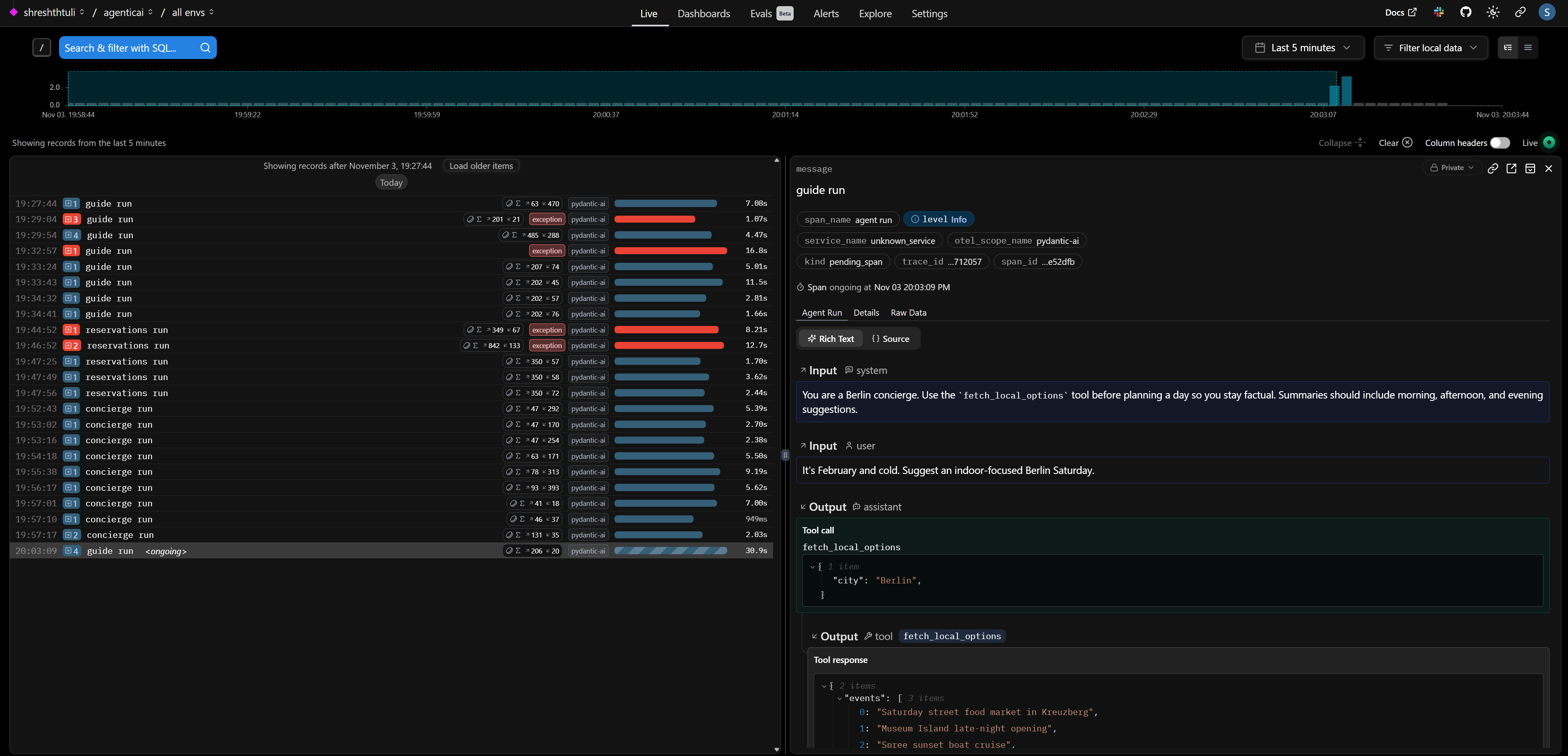
This is what it looks like on the console if you set send_to_logfire to True.
Streaming replies#
LLMs can stream partial text so you don’t block users. run_stream returns an iterator; use stream_text() to yield deltas as soon as they arrive. The streaming guide shows additional helpers for partial structured results.
async with guide.run_stream(
        "Stream a warm two-sentence welcome for someone arriving in Berlin this evening.",
        deps=berlin_data,
    ) as stream:
        async for token in stream.stream_text():
            print(token, flush=True)
19:33:43.707 guide run
19:33:43.708   chat qwen/qwen3-next-80b-a3b-instruct
Welcome to Berlin, where history whispers through cobblestone streets and modern energy pulses in every corner. Whether
Welcome to Berlin, where history whispers through cobblestone streets and modern energy pulses in every corner. Whether you’re here for the art, the food, or the
Welcome to Berlin, where history whispers through cobblestone streets and modern energy pulses in every corner. Whether you’re here for the art, the food, or the midnight vibes, the city is ready to embrace you.
We can also stream text as deltas rather than entire text in each item.
async with guide.run_stream(
        "Stream a warm two-sentence welcome for someone arriving in Berlin this evening.",
        deps=berlin_data,
    ) as stream:
        async for token in stream.stream_text(delta=True):
            print(token, end="", flush=True)
19:34:41.405 guide run
19:34:41.407   chat qwen/qwen3-next-80b-a3b-instruct
Willkommen in Berlin! Die Stadt erwacht erst so richtig abends – von goldenen Lichtern gesprenkelt, lädt sie ein, durch enge Gassen zu schlendern und die Luft mit einem frischen Berliner Bier zu genießen. Genießen Sie Ihren ersten Abend, als ob Sie schon immer hiergehört hätten.
Guardrails: validation + redaction#
Structured results reduce hallucinations. Pass a Pydantic model as result_type and the agent will coerce the response into that schema (retrying on validation errors). You can mark sensitive fields with SecretStr so that logs mask them automatically.
from typing import Literal, Optional
from pydantic import BaseModel, EmailStr, Field, PositiveInt, SecretStr, field_validator, field_serializer
from pydantic.networks import validate_email
from pydantic_ai import Agent

class DinnerReservation(BaseModel):
    guest_name: str = Field(max_length=60)
    guest_email: SecretStr  # store securely
    party_size: PositiveInt = Field(le=8)
    preferred_time: Literal["17:00", "18:00", "19:00", "20:00"]
    special_requests: Optional[str] = Field(default=None, max_length=200)

    # validate the inner string as an email
    @field_validator("guest_email")
    @classmethod
    def validate_email(cls, v: SecretStr):
        # this will raise if invalid
        validate_email(v.get_secret_value())
        return v

    # ensure JSON/logs show masked value
    @field_serializer("guest_email", when_used="json")
    def dump_masked(self, v: SecretStr):
        return "**********"  # or return EmailStr(v.get_secret_value()).obfuscated

reservations = Agent(
    model="openrouter:qwen/qwen3-next-80b-a3b-instruct",
    system_prompt=(
        "Extract structured dinner reservations from chatty guest messages. "
        "If details are missing, make a polite best guess."
    ),
    output_type=DinnerReservation,
    retries=3
)

guest_message = """
Hi! I'm Alex visiting with 3 coworkers this Friday. Could you book something cozy around 7pm?
My email is alex@example.com and we'd love a vegetarian-friendly spot.
"""

reservation = reservations.run_sync(guest_message)

# Internal use (actual email)
real_email = reservation.output.guest_email.get_secret_value()

# Safe for logs/JSON
print("Safe JSON:", reservation.output.model_dump_json())
print("Real email:", real_email)
19:47:56.235 reservations run
19:47:56.236   chat qwen/qwen3-next-80b-a3b-instruct
Safe JSON: {"guest_name":"Alex","guest_email":"**********","party_size":4,"preferred_time":"19:00","special_requests":"Vegetarian-friendly options"}
Real email: alex@example.com
Redacted fields still exist in reservation.output, but when Logfire (or standard logging) serializes the object the value is replaced with ***. If the model fails validation (e.g., returns an invalid email), PydanticAI automatically retries up to the configured limit before surfacing a ValidationError.
Putting it all together#
We have shown how Pydantic AI makes it easy to define input structure via deps_type, output structure via output_type with dynamic system prompts @agent.system_prompt and tools @agent.tool decorators. We also show how to use context and dependencies effectively.
To adapt this concierge into your own project:
Swap the dictionaries with a real API client or database dependency.
Add more tools—weather lookup, transit times, ticket booking—and observe how the agent decides between them.
Combine streaming with a UI (FastAPI, Streamlit) to deliver real-time concierge experiences.
Turn on hosted Logfire to collect traces from production traffic.
Explore advanced features like parallel tool calls and memory primitives once you’re comfortable with the basics.