01. A Very Simple Agent#
Welcome to the first notebook of this series! This course guides you on how to develop Agentic AI workflows, from theory to practice, and highlights key ideas and concepts required to develop production-ready AI applications.
But what is Agentic AI? In simple terms, agents are language models (such as GPT, Claude, etc.) with tools and memory. Let’s break this down. Agents = LLMs + Tools + Memory:
LLM provides reasoning, planning, and language understanding/production.
Tools extend capability (e.g., calculator, web fetcher, code runner, database query). Think actuators or APIs that the LLM can call.
Memory gives state across turns (short‑term scratchpad and/or long‑term profile/knowledge).
Why agents?#
Pure LLMs can sound smart but hallucinate or lack real‑world actions.
With tools, the model can check facts, run code, or retrieve data instead of guessing.
With memory, it becomes context‑aware across sessions and tasks.
Other benefits include modularity, ability to parallize tasks with multiple agents and much better performance compared to non-agentic systems.
Although this course does not require the reader to know the details of how LLMs work, if you are interested to know, feel free to check out LLMs from Scratch. LLMs act as the “brain” in agentic systems, which are also referred to as “workflows” because there may be constant back-and-forth across multiple LLMs, tool calls and memory state updates. There is an entire spectrum of autonomy that that we can give these LLMs, from being less autonomous - having hardcoded workflow of tool and memory use - to more autonomous, where the LLM decides which tool to use and how. See the examples for an agent that researches for a given topic and provides as essay below to highlight the two ends of this spectrum.
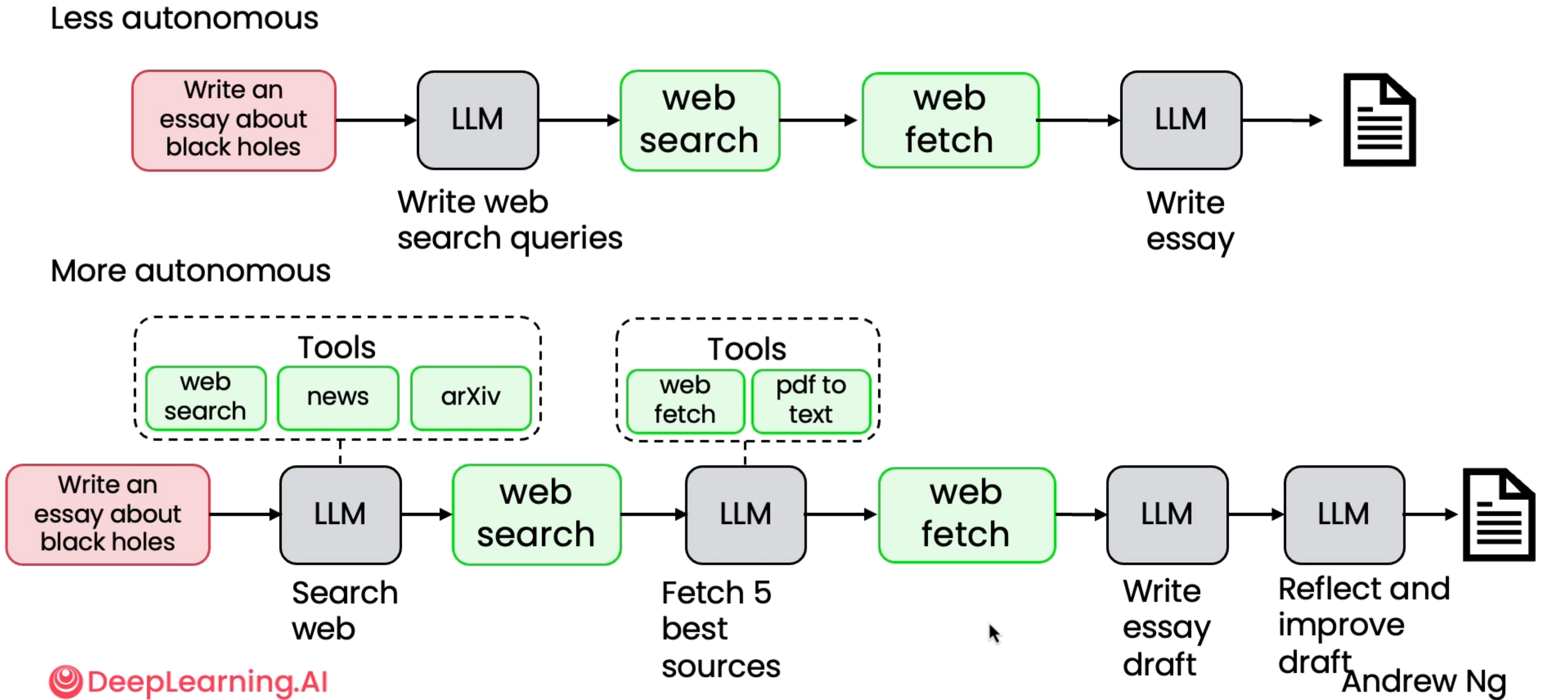
I recommend watching Andrew Ng’s Lecture on Agentic AI. To read more about LLM Memory systems read this blog.
However, this required typical LLMs to be very precise in terms of the structure of outputs that they produce. It is not as straightforward as it sounds. Let’ see this using OpenRouter, which is a unified interface to call all LLMs.
Make sure to populate the
.envfile with the required keys.
Structured Outputs#
Structured outputs turn an LLM’s free-form text into machine-readable actions, which is the foundation of any reliable agent. Here’s why they matter:
Deterministic control → Agents must make decisions, not poetry. Structured schemas (JSON, Pydantic models) enforce predictable formats.
Tool interoperability → Tools, APIs, databases, and other agents expect typed fields, not paragraphs.
Error catching → Validation instantly flags missing or malformed fields, preventing silent failures.
Multi-step reasoning → Complex agent pipelines (planning → acting → reflecting) need cleanly structured state passed between steps.
Safety & alignment → Structure reduces hallucinations by constraining what the model can output.
In short: no structure → no reliable agents. Structured outputs are the contract that turns an LLM into a real, programmable, dependable agent.
from openai import OpenAI
from dotenv import load_dotenv
import os

load_dotenv()

client = OpenAI(
  base_url="https://openrouter.ai/api/v1",
  api_key=os.getenv("OPENROUTER_API_KEY"),
)

completion = client.chat.completions.create(
  model="qwen/qwen-2.5-7b-instruct",
  messages=[
    {
      "role": "user",
      "content": "What is the meaning of life?"
    }
  ]
)

print(completion.choices[0].message.content)
The meaning of life is a question that has puzzled many and has been explored from various perspectives, including philosophy, science, religion, and personal experiences. There isn't one definitive answer, but here are some common interpretations:

1. Biological explanation: From a purely scientific perspective, the meaning of life might be seen as the continuation of life through reproduction and the adaptation of organisms to their environments.

2. Personal and existential interpretation: Many people find meaning in life through their personal goals, values, and relationships. For some, the purpose of life may be to experience joy, love, and fulfillment. For others, it might be to contribute to society, achieve success, or find happiness.

3. Philosophical and religious perspectives: Some believe that the meaning of life comes from a higher power, spiritual existence, or a divine plan. This could involve seeking enlightenment, understanding the universe, or achieving a spiritual state.

4. Societal and cultural context: The meaning of life can be shaped by the values, traditions, and goals of a society or community. People may feel that their lives have meaning by working towards a common good or fulfilling their roles within the society.

It's important to note that the meaning of life is a highly subjective concept, and different people may attribute different meanings to their lives based on their experiences, beliefs, and values.
Probably too deep a question to be the first prompt for the course :p.
Let’s try to generate a structured response now.
We shall use Pydantic data validation library to create models/schemas for structured outputs and validate responses with set schemas. For example, a BaseModel object has a JSON schema as follows.
from pydantic import BaseModel, Field

class Itinerary(BaseModel):
    city: str = Field(description="city name")
    days: int = Field(description="number of days in that city")
    highlights: list[str] = Field(description="things to do")

Itinerary.model_json_schema()
{'properties': {'city': {'description': 'city name',
   'title': 'City',
   'type': 'string'},
  'days': {'description': 'number of days in that city',
   'title': 'Days',
   'type': 'integer'},
  'highlights': {'description': 'things to do',
   'items': {'type': 'string'},
   'title': 'Highlights',
   'type': 'array'}},
 'required': ['city', 'days', 'highlights'],
 'title': 'Itinerary',
 'type': 'object'}
We use the model_validate_json() method of the BaseModel object to check and generate an Itinerary object.
from rich import print as rprint

def get_example_itinerary(model):
    completion = client.chat.completions.create(
    model=model,
    messages=[
        {
        "role": "user",
        "content": f"Give an example Itinerary as a json object with the schema: {Itinerary.model_json_schema()} and nothing else."
        }
    ]
    )
    return completion.choices[0].message.content

qwen_response = get_example_itinerary('qwen/qwen-2.5-7b-instruct')
gpt_response = get_example_itinerary('openai/gpt-oss-20b:free')
rprint("Qwen 2.5 Response:\n", qwen_response)
rprint("GPT OSS Response:\n", gpt_response)
Qwen 2.5 Response:
 Here is an example itinerary as a JSON object following the provided schema:

```json
{
  "city": "Amsterdam",
  "days": 3,
  "highlights": [
    "Visit the Rijksmuseum",
    "Explore the Anne Frank House",
    "Enjoy a canal cruise",
    "Experience the Van Gogh Museum",
    "Shop at the Albert Cuyp Market"
  ]
}
```
GPT OSS Response:
 {
  "city": "Kyoto",
  "days": 5,
  "highlights": [
    "Visit Kinkaku-ji (Golden Pavilion)",
    "Stroll through Arashiyama Bamboo Grove",
    "Explore Nijo Castle",
    "Participate in a traditional tea ceremony",
    "Enjoy a night stroll along Gion district"
  ]
}
Let’s see if this works.
Itinerary.model_validate_json(qwen_response)
---------------------------------------------------------------------------
ValidationError                           Traceback (most recent call last)
Cell In[98], line 1
----> 1 Itinerary.model_validate_json(qwen_response)

File c:\Users\SHRESHTH\Desktop\build-your-own-super-agents\.venv\Lib\site-packages\pydantic\main.py:766, in BaseModel.model_validate_json(cls, json_data, strict, extra, context, by_alias, by_name)
    760 if by_alias is False and by_name is not True:
    761     raise PydanticUserError(
    762         'At least one of `by_alias` or `by_name` must be set to True.',
    763         code='validate-by-alias-and-name-false',
    764     )
--> 766 return cls.__pydantic_validator__.validate_json(
    767     json_data, strict=strict, extra=extra, context=context, by_alias=by_alias, by_name=by_name
    768 )

ValidationError: 1 validation error for Itinerary
  Invalid JSON: expected value at line 1 column 1 [type=json_invalid, input_value='Here is an example itine...yp Market"\n  ]\n}\n```', input_type=str]
    For further information visit https://errors.pydantic.dev/2.12/v/json_invalid
Clearly, Qwen 2.5 model response is not as per the required format. This is because Qwen 2.5 models weren’t tuned for structured responses.
Itinerary.model_validate_json(gpt_response)
Itinerary(city='Kyoto', days=5, highlights=['Visit Kinkaku-ji (Golden Pavilion)', 'Stroll through Arashiyama Bamboo Grove', 'Explore Nijo Castle', 'Participate in a traditional tea ceremony', 'Enjoy a night stroll along Gion district'])
GPT OSS models, on the other hand, have been tuned to provide structured responses. Although, there are workaronuds to this, such as using reflection and other concepts (we discuss these in a future tutorial), but for now we shall use models that are tuned to give structured outputs. Another thing we can do, is to explicitly provide a response format in the API call.
The way this works is called constrained decoding. The core mechanism for enforcement is constrained decoding. Instead of letting the model generate tokens freely, the API dynamically validates each token generated against the provided JSON schema. If a generated token would lead to an output that violates the schema, the model is prevented from generating it, and the generation process is guided towards valid tokens. This ensures that the final output strictly adheres to the defined structure.
Reference: HuggingFace Docs.
response_format = {
    "type": "json_schema",
    "json_schema": {
        "name": "Itinerary",
        "schema": Itinerary.model_json_schema(),
        "strict": True,
    },
}

def get_example_itinerary_enforced(model):
    completion = client.chat.completions.create(
    model=model,
    response_format=response_format,
    messages=[
        {
        "role": "user",
        "content": f"Give an example Itinerary as a json object with the schema: {Itinerary.model_json_schema()} and nothing else."
        }
    ]
    )
    return completion.choices[0].message.content

qwen_response = get_example_itinerary('qwen/qwen-2.5-7b-instruct')
gpt_response = get_example_itinerary('openai/gpt-oss-20b:free')

print(Itinerary.model_validate_json(qwen_response))
print(Itinerary.model_validate_json(gpt_response))
city='Paris' days=3 highlights=['Visit the Eiffel Tower', 'Explore the Louvre Museum', 'Stroll through the Champs-Élysées', 'Enjoy a boat ride on the Seine', 'Dine at a traditional French restaurant']
city='Kyoto' days=3 highlights=['Visit Kinkaku-ji (Golden Pavilion)', 'Stroll through Arashiyama Bamboo Grove', 'Explore Fushimi Inari Shrine', 'Attend a traditional tea ceremony']
As you can see here, a typical structured output in the JSON format may not be the most token-efficient, subsequently leading to higher cost footprint as it repeats keys. See a json example below:
{
  "users": [
    { "id": 1, "name": "Alice", "role": "admin" },
    { "id": 2, "name": "Bob", "role": "user" }
  ]
}
Now, if we describe the same data in a tabular format:
users[2]{id,name,role}:
  1,Alice,admin
  2,Bob,user
This is far more token efficient, which means faster and cheaper inference. This is the Token-Oriented Object Notation or the TOON format. It provides a lossless serialization of the same objects, arrays, and primitives as JSON, but in a syntax that minimizes tokens and makes structure easy for models to follow. However, this is a new format and not very widely used (at the time of creation of this course) and the most popular LLM API providers like OpenRouter only support JSON. Hence, we stick with JSON for this course.
A Very Simple Agent#
Now that we’ve seen how to generate structured responses, let’s build a very simple agent that sorts given lists. We will use Bubble Sort like sorting in this example and show how a non-agentic system dwarfs in comparison to an agentic system.
🧩 Step 1: Define Agentic Building Blocks#
In this section, we define the core components of our agentic sorting framework using Pydantic for structured reasoning and memory management.
LLMResponse — Structured Output Format This defines how the LLM communicates with the environment:
thought: natural language reasoning or explanation of the next action.swaps: a list of index pairs(i, j)representing swap operations the agent wants to perform this step.
(Multiple swaps can be proposed; they will be applied sequentially, so later indices may change after earlier swaps.)final_answer: the sorted list, returned when the agent decides the task is complete.
AgentState — Persistent Memory Stores the agent’s internal state across steps:
current_list: the current working list of numbers.last_swap: the most recent swap pair.did_swap_last_step: boolean flag to track if a swap occurred.last_swap_message: concatenated messages describing recent swaps.stepandmax_steps: iteration counters and safety limits.
binary_swap Tool — Environment Action A simple deterministic operation that:
Compares values at indices
iandj.Swaps them if they are out of order.
Returns a message describing what happened (used for traceability and feedback).
Together, these three components form the foundation of an agentic loop:
LLM → proposes swaps → tool executes swaps → memory updates → LLM observes new state
from typing import List, Optional, Tuple, Dict, Any
from pydantic import BaseModel, Field

# ---------- Response format (Pydantic) ----------
class LLMResponse(BaseModel):
    thought: str
    swaps: Optional[List[Tuple[int, int]]] = None # example: [[1, 2], [0, 1], [4, 9]]
    final_answer: Optional[List[int]] = None     # only one or the other is used

# ---------- Agent Memory (Pydantic) ----------
class AgentState(BaseModel):
    current_list: List[int]
    last_swap: Optional[Tuple[int, int]] = None
    did_swap_last_step: bool = False
    last_swap_message: str = ""
    step: int = 0
    max_steps: int = 5000  # safety

# ---------- Tool: binary swap ----------
def binary_swap(state: AgentState, i: int, j: int):
    """Compare and swap elements directly in state."""
    if not (0 <= i < len(state.current_list) and 0 <= j < len(state.current_list)):
        return f"Invalid indices ({i}, {j})"
    if i > j:
        i, j = j, i
    if state.current_list[i] > state.current_list[j]:
        state.current_list[i], state.current_list[j] = state.current_list[j], state.current_list[i]
        state.did_swap_last_step = True
        state.last_swap = (i, j)
        return f"Swapped positions {i} and {j}"
    else:
        state.did_swap_last_step = False
        return f"No swap needed for {i}, {j}"
⚙️ Step 2: Connect the Agent with the LLM#
Now that we have defined our data structures and tools, we can integrate a real LLM backend to power decision-making.
Here, the agent uses a model (e.g., x-ai/grok-4-fast) to reason about the current list and decide whether to:
Propose a set of swaps — a list of index pairs
(i, j)to apply sequentially using thebinary_swaptool.Return the final sorted list — once it determines that the list is already sorted.
🧠 Key Ideas
The
response_formatenforces that the model must reply strictly in JSON following theLLMResponseschema.The prompt clearly describes:
The available tool (
swaps([(i1, j1), (i2, j2), ...]))That swaps are applied sequentially, so later indices may shift.
The valid output structures for ongoing steps or final answers.
The agent loop (
agentic_sort) repeatedly:Sends the current list to the LLM.
Receives a structured
LLMResponse.Executes each proposed swap sequentially using
binary_swap.Updates the agent’s memory (
last_swap_message) and continues until sorted.
🔁 Flow Summary
State → LLM Reasoning → Swaps → Tool Execution → Updated State → Repeat → Final Answer
This closed feedback loop demonstrates how a minimal agentic system can combine:
LLM reasoning (planning)
Tool use (action)
Memory updates (state tracking) to solve a simple but non-trivial task — sorting — in an interpretable and iterative way.
This cycle mimics the essence of agentic AI: LLM + Tools + Memory = Iterative Intelligence.
MODEL = 'x-ai/grok-4-fast'

response_format = {
    "type": "json_schema",
    "json_schema": {
        "name": "LLMResponse",
        "schema": LLMResponse.model_json_schema(),
        "strict": True,
    },
}

# ---------- LLM Call ----------
def call_llm(state: AgentState) -> LLMResponse:
    """Ask the model to either call the tool or return the final answer in JSON."""
    prompt = f"""
You are an AI agent that helps sort lists of numbers in ascending order using a binary swap tool.

Tool available:
- swaps([(i1, j1), (i2, j2) ...]): compares items at positions i1 and j1, swaps if needed. Can be any two indices. Can take up to 20 pairs. Use minimal swaps.
Remember: swaps are applied SEQUENTIALLY, so later indices can shift after earlier swaps.

Current list: {state.current_list}
You may output EITHER:
1. A tool call if the list is not sorted:
{{
  "thought": "...",
  "swaps": [[i1, j1], [i2, j2], ...],  // list of ordered index pairs
  "final_answer": null
}}
2. A final answer if sorted:
{{
  "thought": "...",
  "swaps": null,
  "final_answer": [sorted_list]
}}

Respond with **only valid JSON**.
"""

    completion = client.chat.completions.create(
            model=MODEL,
            response_format=response_format,
            max_tokens=12929,
            reasoning_effort="minimal",
            messages=[
                {
                "role": "user",
                "content": prompt
                }
            ]
        )
    content = completion.choices[0].message.content
    return LLMResponse.model_validate_json(content)


# ---------- Agentic Loop ----------
def agentic_sort(xs: List[int], verbose: bool = False):
    state = AgentState(current_list=xs[:])
    while state.step < state.max_steps:
        state.step += 1
        resp = call_llm(state)
        if verbose: print(f"[{state.step}] {resp}")

        if resp.final_answer is not None:
            return resp.final_answer, state.step

        if resp.swaps:
            all_msgs = []
            for (i, j) in resp.swaps:
                msg = binary_swap(state, i, j)
                all_msgs.append(msg)
                if verbose:
                    print(f"   ↳ {msg}")
            state.last_swap_message = " | ".join(all_msgs)
    return state.current_list, state.step

xs = [5, 3, 8, 1, 4]
print("Original:", xs)
final_list, _ = agentic_sort(xs, verbose=True)
print("Final:", final_list)
Original: [5, 3, 8, 1, 4]
[1] thought="The list [5, 3, 8, 1, 4] is not sorted. I'll perform a selection sort-like approach with minimal swaps. First, swap index 0 (5) with index 3 (1) to place 1 at the front, resulting in [1, 3, 8, 5, 4]. Then, swap index 2 (8) with index 4 (4) to place 4 correctly, resulting in [1, 3, 4, 5, 8], which is now sorted." swaps=[(0, 3), (2, 4)] final_answer=None
   ↳ Swapped positions 0 and 3
   ↳ Swapped positions 2 and 4
[2] thought='The list is already sorted in ascending order.' swaps=None final_answer=[1, 3, 4, 5, 8]
Final: [1, 3, 4, 5, 8]
⚡ Step 3: Define a Non-Agentic (Direct LLM) Baseline#
Before comparing results, we build a simple non-agentic baseline — a direct LLM call that produces the sorted list in one shot, without any reasoning loop, memory, or tool use.
🧩 1. Response Format — SimpleResponse This minimal schema ensures that the model must return only:
final_answer: a list of integers representing the sorted result.
⚙️ 2. Response Format Enforcement
We define simple_format to constrain the model output to valid JSON using the same schema-based control mechanism as before.
This keeps the output predictable and prevents hallucinated text.
🧠 3. Direct Sorting Prompt The prompt is intentionally simple:
“You are an AI agent that provides a sorted list for the input …”
Unlike the agentic version, there is no iterative feedback, no state tracking, and no tool invocation.
The model simply attempts to return a sorted list in one go.
🔍 4. Why This Matters This one-shot “non-agentic” baseline helps us compare:
Accuracy: How often the model sorts correctly in a single pass.
Reliability: How consistent the outputs are for longer lists.
Efficiency: How much faster a direct call is versus iterative reasoning.
We’ll use this baseline next to evaluate the benefits of agentic reasoning with tools and memory.
class SimpleResponse(BaseModel):
    final_answer: List[int]

simple_format = {
    "type": "json_schema",
    "json_schema": {
        "name": "list_response",
        "schema": SimpleResponse.model_json_schema(),
        "strict": True,
    },
}

# ---------- None-Agentic Sort ----------
def nonagentic_sort(xs: List[int], reasoning: str = "minimal"):
    """Ask the model to directly produce the sorted list."""
    prompt = f"You are an AI agent that provides a sorted list for the input: {xs}. Provide your response in json."
    completion = client.chat.completions.create(
            model=MODEL,
            reasoning_effort=reasoning,
            response_format=simple_format,
            messages=[
                {
                "role": "user",
                "content": prompt
                }
            ]
        )
    content = completion.choices[0].message.content
    return SimpleResponse.model_validate_json(content).final_answer

xs = [5, 3, 8, 1, 4]
print("Original:", xs)
final_list = nonagentic_sort(xs)
print("Final:", final_list)
Original: [5, 3, 8, 1, 4]
Final: [1, 3, 4, 5, 8]
This works too! But, let’s see how these perform for very long lists.
import numpy as np
import pandas as pd
from tqdm import trange
from time import time
import random

# ---------- Evaluation ----------
def run_experiment(num_trials: int = 50, max_list_len: int = 80) -> pd.DataFrame:
    rows = []
    for t in trange(num_trials, desc="Running Experiment"):
        list_len = random.randint(max_list_len // 2, max_list_len)
        xs = np.random.randint(0, 1000, size=list_len).tolist()
        gold = sorted(xs)

        # Direct LLM baseline
        start_direct = time()
        direct_error = 0
        try:
            pred_direct = nonagentic_sort(xs)
            acc_direct = int(pred_direct == gold)
        except:
            direct_error = 1
            acc_direct = 0
        direct_time = time() - start_direct

        # Agentic
        start_agentic = time()
        agentic_error = 0
        try:
            pred_agent, steps = agentic_sort(xs)
            acc_agent = int(pred_agent == gold)
        except:
            agentic_error = 1
            acc_agent = 0; steps = 0
        agentic_time = time() - start_agentic

        rows.append({
            "trial": t,
            "n": list_len,
            "direct_exact": acc_direct,
            "agent_exact": acc_agent,
            "agent_steps": steps,
            "direct_time_sec": round(direct_time, 2),
            "agent_time_sec": round(agentic_time, 2),
            "direct_error": direct_error,
            "agent_error": agentic_error
        })
    return pd.DataFrame(rows)

df = run_experiment(num_trials=10, max_list_len=100)
print("\nPer-trial head():")
print(df.head().to_string(index=False))

# Summary
summary = (df.mean(numeric_only=True).to_frame(name="mean").T
    .assign(direct_accuracy_pct=lambda x: (x["direct_exact"] * 100).round(1),
        agent_accuracy_pct=lambda x: (x["agent_exact"] * 100).round(1),
        avg_list_len=lambda x: round(x["n"], 1)).round(2))

print("\n=== Summary Statistics ===")
display(summary[[
    "avg_list_len",
    "direct_accuracy_pct",
    "agent_accuracy_pct",
    "agent_steps",
    "direct_time_sec",
    "agent_time_sec",
    "direct_error",
    "agent_error"
]])
Running Experiment: 100%|██████████| 10/10 [49:08<00:00, 294.87s/it]
Per-trial head():
 trial  n  direct_exact  agent_exact  agent_steps  direct_time_sec  agent_time_sec  direct_error  agent_error
     0 64             1            1            8            13.14          320.00             0            0
     1 58             1            1            6             5.28          153.04             0            0
     2 68             1            1            7             8.80          196.17             0            0
     3 93             0            1           10             6.58          479.37             0            0
     4 52             1            1            6             4.50          124.90             0            0

=== Summary Statistics ===
| avg_list_len | direct_accuracy_pct | agent_accuracy_pct | agent_steps | direct_time_sec | agent_time_sec | direct_error | agent_error | |
|---|---|---|---|---|---|---|---|---|
| mean | 69.1 | 70.0 | 100.0 | 8.5 | 6.7 | 288.17 | 0.0 | 0.0 |
import seaborn as sns
import matplotlib.pyplot as plt
import scienceplots

plt.style.use(['science', 'no-latex'])

df_melted = pd.melt(
    df,
    id_vars=["n"],
    value_vars=["direct_exact", "agent_exact"],
    var_name="system",
    value_name="accuracy"
)
df_melted["system"] = df_melted["system"].str.replace("_exact", "")

# Create 2x2 subplot grid
fig, axes = plt.subplots(2, 2, figsize=(12, 6), dpi=300)
plt.suptitle("Direct LLM vs Agentic System — Performance Comparison", fontsize=14, y=0.97)

# (1) Accuracy vs list length
acc_by_n = (
    df_melted.groupby(["system", "n"], as_index=False)["accuracy"].mean()
    .sort_values(["system", "n"])
)

def smooth_group(g, w=9):
    # uniform kernel of width w
    k = np.ones(w) / w
    y = g["accuracy"].to_numpy()
    g = g.copy()
    g["accuracy_smooth"] = np.convolve(y, k, mode="same")
    return g

acc_smooth = acc_by_n.groupby("system", group_keys=False).apply(lambda g: smooth_group(g, w= nine if (nine:=9) else 9))  # w=9 by default
sns.scatterplot(ax=axes[0, 0], data=acc_by_n, x="n", y="accuracy", hue="system", alpha=0.35, s=18, legend=False)
sns.lineplot(ax=axes[0, 0], data=acc_smooth, x="n", y="accuracy_smooth", hue="system")
axes[0, 0].set_title("Accuracy vs List Length (Smoothed)")
axes[0, 0].set_ylabel("Accuracy (1 = Perfect)")
axes[0, 0].grid(True, linestyle="--", alpha=0.5)

# (2) Time comparison
sns.lineplot(ax=axes[0, 1], data=df, x="n", y="direct_time_sec", label="Direct LLM", marker="o")
sns.lineplot(ax=axes[0, 1], data=df, x="n", y="agent_time_sec", label="Agentic", marker="o")
axes[0, 1].set_title("Computation Time vs List Length")
axes[0, 1].set_ylabel("Time (s)")

# (3) Steps comparison (Direct = 1)
sns.scatterplot(ax=axes[1, 0], x=df["n"], y=[1]*len(df), label="Direct LLM (1 step)")
sns.scatterplot(ax=axes[1, 0], x=df["n"], y=df["agent_steps"], label="Agentic (variable)")
axes[1, 0].set_title("Steps per Sort")
axes[1, 0].set_ylabel("Steps")

# (4) Accuracy distribution
sns.barplot(ax=axes[1, 1], data=df_melted, x="system", y="accuracy")
axes[1, 1].set_title("Accuracy Distribution Across Trials")
axes[1, 1].set_ylabel("Accuracy")

# Style tweaks
for ax in axes.flat:
    ax.grid(True, linestyle="--", alpha=0.5)

plt.tight_layout()
plt.show()
C:\Users\SHRESHTH\AppData\Local\Temp\ipykernel_19796\3874934933.py:34: FutureWarning: DataFrameGroupBy.apply operated on the grouping columns. This behavior is deprecated, and in a future version of pandas the grouping columns will be excluded from the operation. Either pass `include_groups=False` to exclude the groupings or explicitly select the grouping columns after groupby to silence this warning.
  acc_smooth = acc_by_n.groupby("system", group_keys=False).apply(lambda g: smooth_group(g, w= nine if (nine:=9) else 9))  # w=9 by default
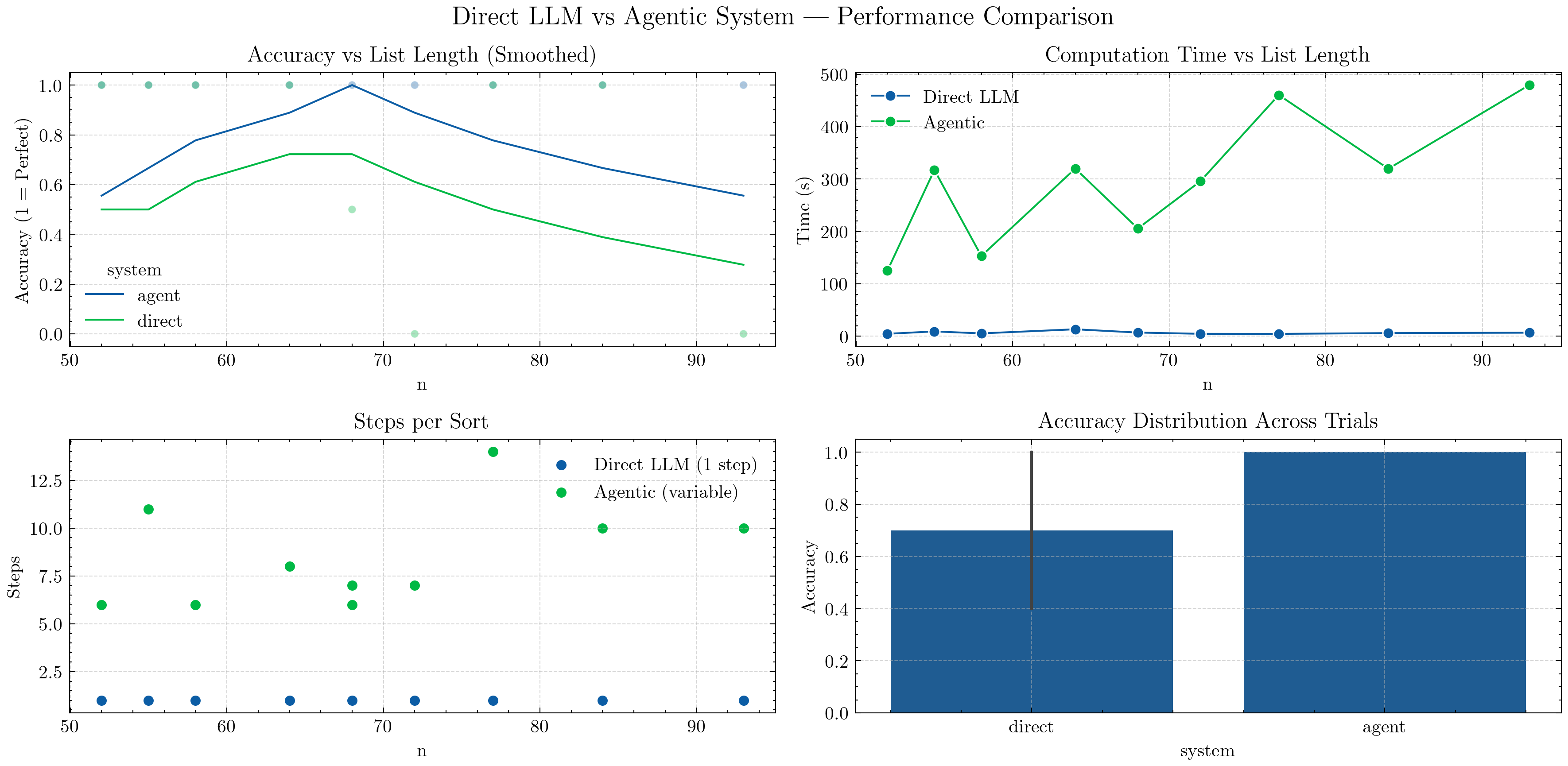
Top-Left — Accuracy vs List Length (Smoothed):
A moving-average convolution smooths accuracy trends across different list lengths.
The Agentic curve remains consistently higher, showing strong generalization to longer lists.
The Direct LLM curve drops as lists grow — single-shot reasoning struggles with scale.
Top-Right — Computation Time vs List Length:
Direct LLM is faster, completing in one pass.
Agentic is slower but scales more predictably — time increases linearly with list length as it iterates through reasoning steps.
Bottom-Left — Steps per Sort:
Direct LLM always requires one step.
Agentic performs variable steps (up to ~10–15), depending on complexity and list disorder — illustrating iterative reasoning.
Bottom-Right — Accuracy Distribution Across Trials:
A smooth KDE (distribution plot) replaces the earlier boxplot to show performance spread.
Agentic accuracy clusters tightly near
1.0, while Direct shows wider variation, indicating lower consistency.
💡 Takeaway: Agentic reasoning trades speed for robustness.
By combining structured reasoning, tool use, and memory, the Agentic system achieves near-perfect accuracy across longer lists — something a one-shot LLM consistently fails to maintain.
The smoother curves and density plots highlight not only performance differences but also stability — Agentic behavior remains predictable even as problem size grows.
So far, we manually built an agentic sorting system using structured outputs, memory, and tools — but this involved a lot of boilerplate: manual JSON parsing, schema enforcement, and repeated model calls. Starting in the next course section, we’ll use Pydantic AI to build all agentic systems — from simple reasoning loops to multi-agent orchestration — because it:
Cuts down repetitive code.
Improves response safety and validation.
Enables optimization and tool-chaining out of the box.
Let’s see this in action in the next tutorial!